Five Tools, One Platform
A full suite of academic integrity tools
Each tool targets a different moment in the academic integrity lifecycle: before, during, and after an assignment.
Student Behavior Insights: spot outliers before grades are posted
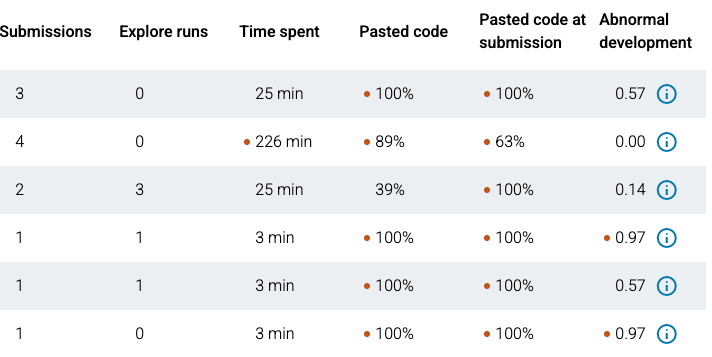
The Student Behavior Insights dashboard shows class-level averages for time spent, paste activity, and submission count on any assignment. Students who fall significantly outside those averages are flagged automatically, giving you a starting point for review. It’s especially valuable as AI tools make traditional integrity measures harder to rely on.
- ✓Track class-level averages for time-on-task, paste events, and submission attempts.
- ✓Automatically flags outliers by time, pasted code volume, and submission count.
- ✓Drill into any flagged student to view their Code Playback directly.
- ✓Identify struggling students who are working earnestly, not just potential academic integrity cases.
Code Playback: see the work, not just the result
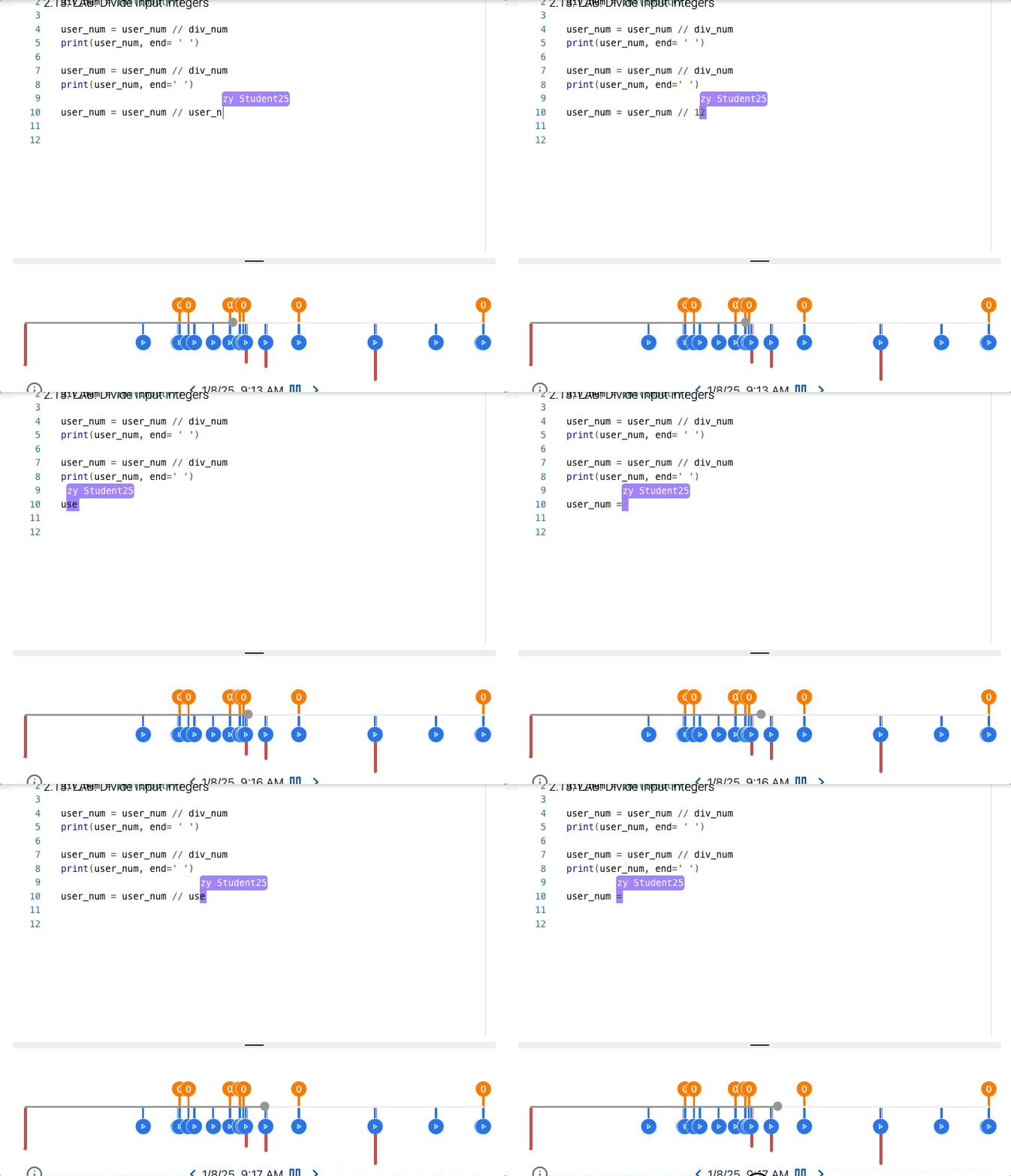
Code Playback lets you replay exactly how the student wrote their program, keystroke by keystroke. You can see where they paused, where they struggled, and when large blocks of code appeared in a single paste event. In the era of AI, how students arrive at answers is just as important as the answers themselves.
- ✓Replay any zyLabs submission keystroke by keystroke.
- ✓Paste events are flagged and timestamped so you can jump straight to them.
- ✓Reveals whether a student worked incrementally or pasted a complete solution.
- ✓Identify where struggling students are getting off track, not just where misconduct may have occurred.
Paste Limiting: raise the barrier without raising the stakes
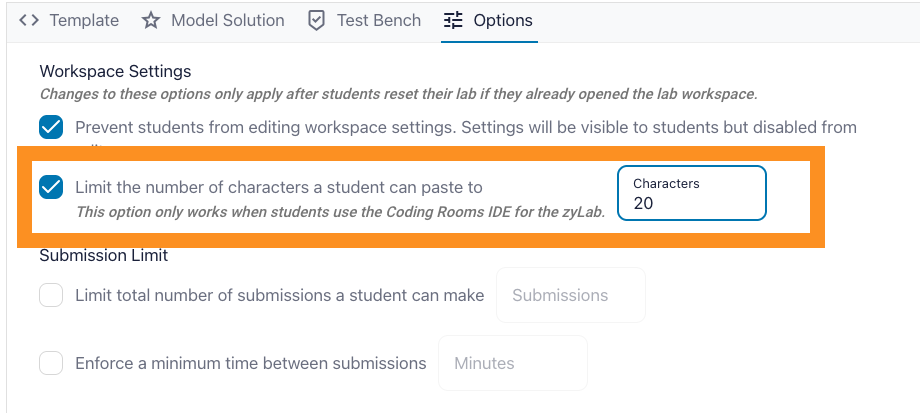
Paste Limiting lets you restrict how much code a student can paste into any zyLab. You set the character limit per assignment. It allows normal workflow (copying a function signature, pasting a variable name) while making it impractical to drop in a full solution from an AI tool or a classmate.
- ✓Enabled per assignment; you decide which labs need it.
- ✓You set the character limit: strict for exams, relaxed for practice labs.
- ✓Students still write freely; the constraint targets bulk copy-paste specifically.
Similarity Checker: find matching submissions automatically
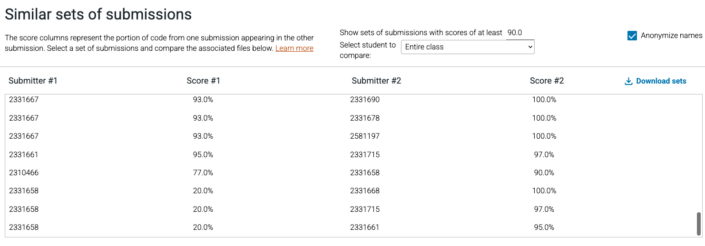
After every assignment deadline, zyBooks runs your class submissions through MOSS, the industry-standard code similarity detection system used by universities worldwide. The integrated report shows you which pairs are similar and by how much, so nothing slips through.
- ✓Automatically runs across all submissions in your class after each deadline.
- ✓Powered by MOSS (Measure of Software Similarity), the standard used by Stanford and institutions worldwide.
- ✓Similarity scores are integrated directly into your zyLabs report with no export needed.
- ✓Identifies structural similarity, not just copy-paste, catching rewrites too.
Assessments with randomized questions and lockdown browser support

zyBooks’ Assessments Platform works with lockdown browsers to prevent tab-switching, screen capture, and access to other applications during an exam. And because every student sees a different question variant drawn from a pooled bank, sharing answers yields little advantage.
- ✓Compatible with lockdown browsers, blocking tab-switching, screen capture, and app access during exams.
- ✓Question pooling draws from a large bank; same topic, different question for each student.
- ✓Highly randomized Challenge Activities mean screenshots of questions are rarely reusable.
- ✓Access controls let you set time windows, attempt limits, and password protection per assessment.
- ✓Auto-graded zyLabs can be embedded directly within a locked assessment.
Teaching Strategy
zyBooks’ tools detect possible academic dishonesty. These teaching strategies help to prevent it.
Use course design to make cheating less appealing, not just harder to commit. zyBooks’ research-backed cheating prevention guide walks you through the strategies that work, with practical examples for CS courses.
Read the cheating prevention guideFAQ
Academic integrity questions instructors ask about zyBooks
These are the questions CS faculty ask us about academic integrity before adopting zyBooks.
Does zyBooks detect cheating?+
How does zyBooks’ Code Playback work?+
What is the Similarity Checker and how does it detect similar code?+
Can zyBooks prevent students from using ChatGPT or other AI tools?+
Does the Assessments Platform work with lockdown browsers?+
How does Paste Limiting work, and which labs should I enable it for?+
Can students see solutions after completing the assessment?+
How does zyBooks handle exam security? Does it work with lockdown browsers?+
See zyBooks’ academic integrity tools in action
Request a demo to see Student Behavior Insights, Code Playback, and the other tools, or request an evaluation copy to explore any zyBook yourself.